Remote access sounds simple: open an app, see the camera. In practice, the difference between a system that works and one you stop using comes down to a handful of unglamorous details. This guide covers what you need to know before you rely on it.
- Remote access needs three things: cameras connected to the internet, a platform that securely brokers the connection, and individual user accounts.
- Avoid exposing cameras directly to the internet. It is the most common way CCTV gets compromised.
- Give each person their own login, and limit it to the locations they need.
- Test your setup from outside the premises before you depend on it.
How remote camera access works, in plain terms
A camera on the shop wall sends video to a recorder over the local network. To watch that video from somewhere else, something has to carry it across the internet to you. There are broadly two ways to do that:
- Direct access. The recorder or camera is opened up to the internet so your phone can reach it. This is quick to set up and risky to leave in place.
- Platform-brokered access. Your cameras connect out to a secure platform, and your authorised users log into that platform. The shop network does not need to be opened up to the world.
For anything more than a single home camera, the second approach is the better foundation.
What you need in place
- A stable internet connection at each site. Remote viewing depends on it. Check upload speed, not only download.
- Cameras and recorders that can be connected. Many existing models can be, subject to model and configuration.
- Individual user accounts. One person, one login.
- A clear idea of who needs to see what. Decide before you create accounts.
Keeping it secure
CCTV that can be reached remotely is CCTV that can be attacked remotely. A few habits make a big difference:
- Change default passwords on every camera and recorder. Default credentials are the first thing automated scans try.
- Do not forward ports to cameras or recorders unless you fully understand the risk.
- Remove access when people leave. With individual accounts this takes a minute. With a shared password it means changing it for everyone.
- Keep firmware updated on cameras and recorders when updates are available.
- Limit access by location. If a person only needs one store, they should only see one store.
If a CCTV system can be reached from the internet with a default password, assume it will be found.
Using it on a phone versus a computer
| Phone or tablet | Computer | |
|---|---|---|
| Best for | Quick checks, on the move | Reviewing several locations, searching footage |
| Typical use | “Has the store opened?” | “Show me the whole region this morning” |
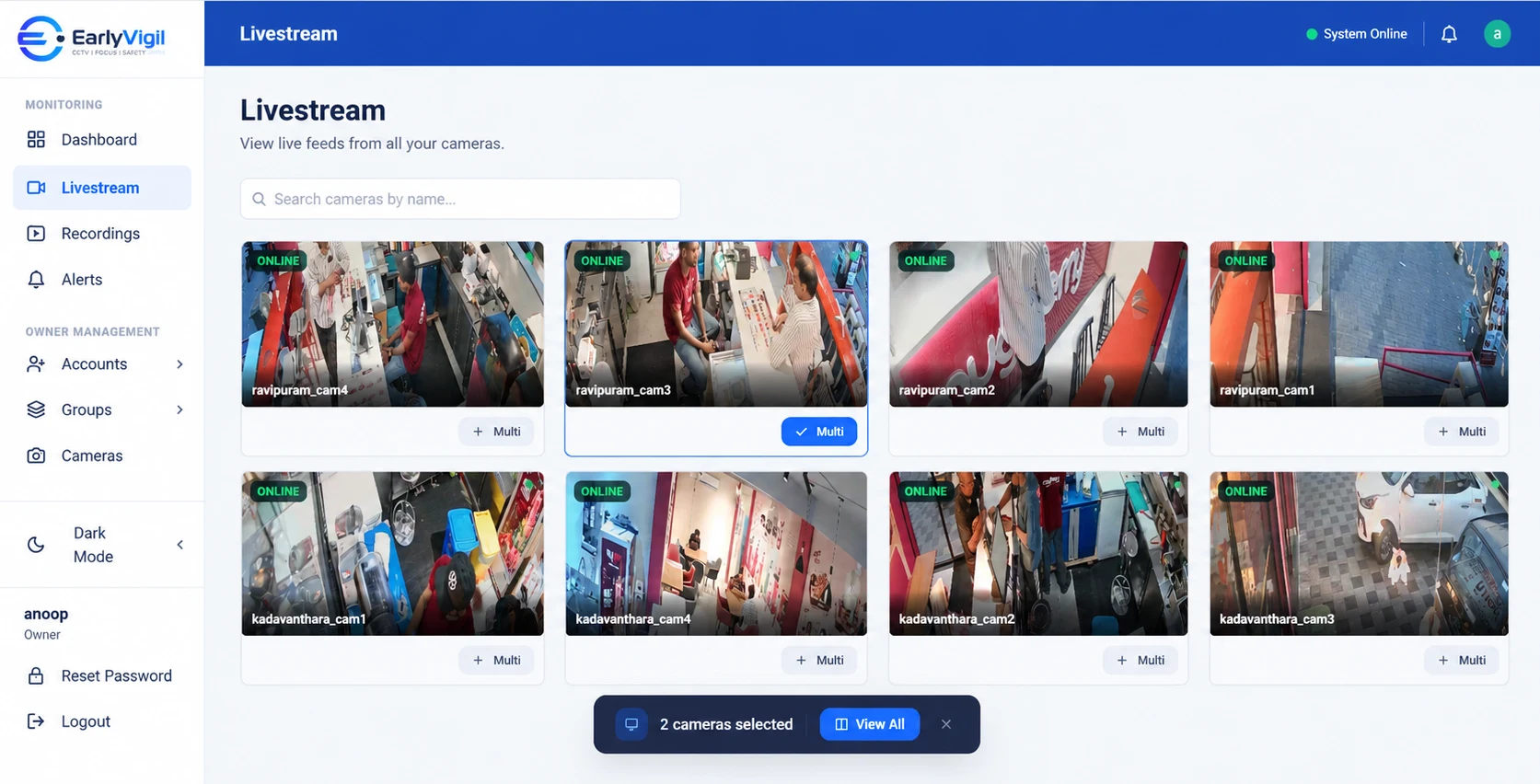
| Watch out for | Mobile data usage and small screens | A wall of tiles can hide detail, so open the camera you care about |
Why connection quality is the part people overlook
A camera stream is a steady flow of data. A single high-resolution camera can use a meaningful share of a small shop’s upload bandwidth, and a site with ten of them can easily outgrow an ordinary broadband plan if everything streams at once. That is why well-designed platforms are selective: they fetch the stream you are looking at, not all of them all the time.
- Check upload speed, not just download. Broadband plans advertise download; remote viewing relies on upload.
- Consider a lower-resolution stream for overview screens. Many cameras provide a second, lighter stream designed for this.
- Plan for outages. A backup connection, such as a mobile data failover, can keep important sites reachable.
- Keep the local recorder running. Even if remote access is interrupted, recording should continue on site.
Before you rely on it
- Test from outside. Use mobile data, not the shop Wi-Fi, to confirm it really works remotely.
- Test at peak time. If the shop network is busy in the evening, see how live view behaves then.
- Check recorded playback as well as live view. They are not always the same thing.
- Write down who has access. Review the list every few months.
With EarlyVigil, authorised users open live and recorded views from a computer or mobile device, and each person sees only the locations assigned to them. To see how that works for your sites, request a walkthrough.
Frequently asked questions
Is it safe to view CCTV from my phone?
It can be safe if cameras are not directly exposed to the internet, default passwords are changed, and each user has an individual account with limited access.
Why is my remote CCTV view slow?
Most often it is limited upload bandwidth at the site, too many high-resolution streams at once, or a busy local network. Your provider can help you tune it.
Can several people watch the same camera at once?
That depends on the platform and the site’s bandwidth. Ask your provider how many simultaneous viewers a camera can support.
See it with your own locations in mind
Book a short walkthrough, or call us on +91 73564 25444.
This article is general information for business owners. Features, camera compatibility and cloud backup depend on your model, configuration and plan. EarlyVigil provides information for people to review; decisions stay with your managers.