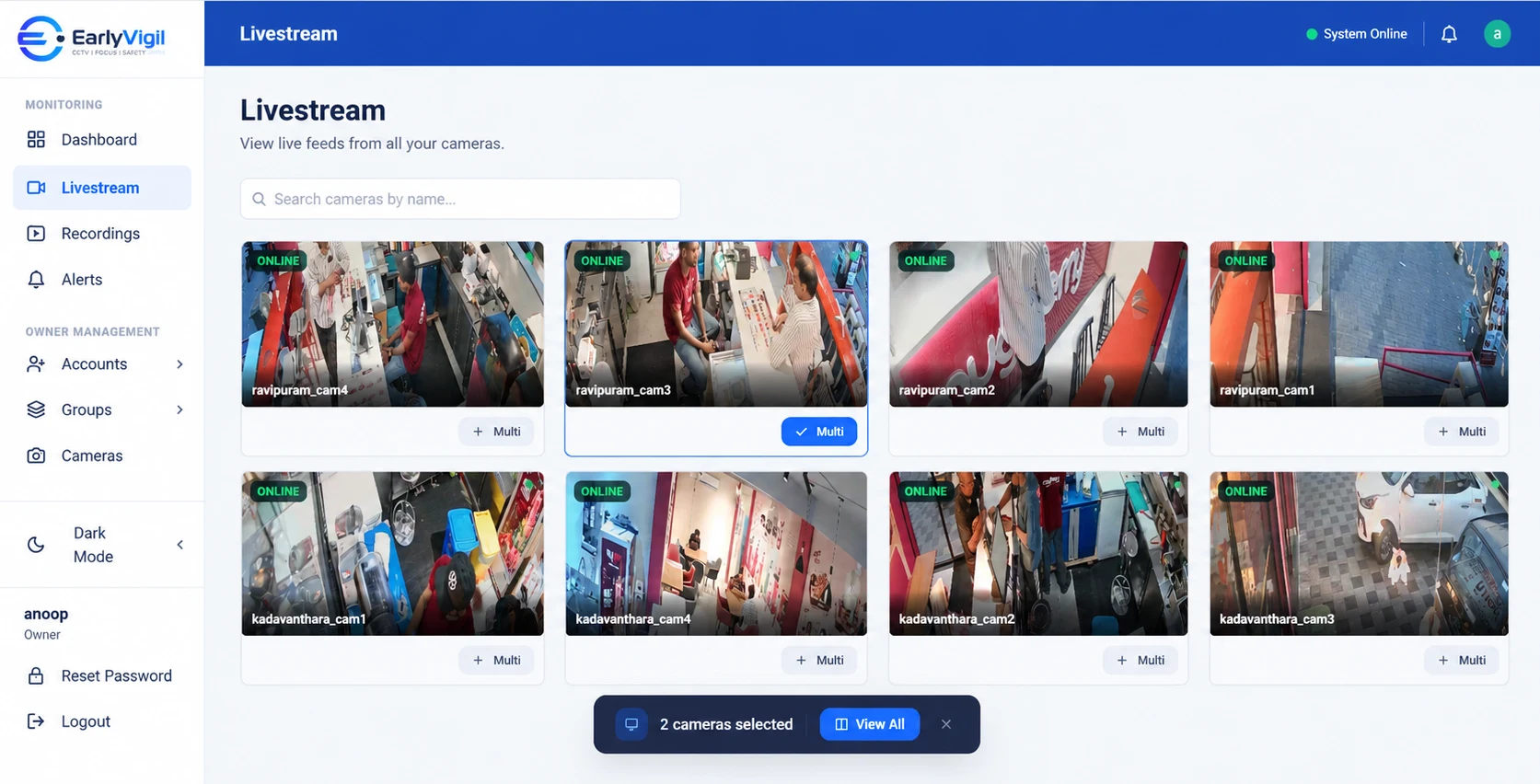
A restaurant group, a supermarket and a franchise network have very different customers. But the person running them shares a problem: every outlet has its own cameras, its own recorder and its own way of doing things, and head office has no easy way to look in.
- Outlet-based businesses benefit most from consistency: the same view, the same access rules, the same alerts at every location.
- Restaurants care about kitchens, counters and closing. Supermarkets care about aisles, billing and stock rooms. Franchises care about comparability.
- Choose a platform that adds a new outlet in a few steps, because you will open another one.
- Role-based access matters more in chains: a franchisee should not see another franchisee’s store.
Why outlet-based businesses struggle with CCTV
Every new outlet is a fresh start for CCTV. A different shop fit-out, a different installer, a different recorder. After a few openings you have a patchwork, and the people responsible for operations spend their time working around it.
The result is predictable. Head office relies on calls and reports. Outlet managers rely on whoever last touched the recorder. Nobody can easily answer a basic question: “Show me what it looks like at Outlet 7 right now.”
What each type of business needs from it
Restaurants and café groups
Restaurant operations are fast and happen in several zones at once. The things worth seeing are usually:
- The entrance and waiting area, to see how busy you are.
- The billing counter, where cash and customer service meet.
- The kitchen pass and back entrance, to understand flow and deliveries.
- Opening and closing routines, which tend to vary between outlets.
Supermarkets and convenience stores
Larger floors and higher footfall bring different questions:
- Billing lanes: are they staffed to match how busy the store is?
- Aisles and high-value areas: where do you want a closer look?
- Stock rooms and receiving bays: who is there, and when?
- Entrances and exits, particularly at opening and closing.
Franchise operators
If you run or support franchised outlets, comparability is everything. You want to see that standards are being followed in the same way across locations, and you need to do it without stepping on the independence of each owner. That makes access control the main feature: who can see which outlet, and nothing more.
What to look for in a central platform
| Need | Why it matters for outlet chains |
|---|---|
| Grouping by region or brand | Lets an area manager open “my outlets” in one view. |
| Per-location access | Keeps each outlet manager or franchisee limited to their own store. |
| Fast camera search | Lets head office jump straight to a specific counter or entrance. |
| Works with existing cameras | Avoids re-fitting every outlet when you adopt it. |
| Simple onboarding of a new outlet | Your next opening should take days of planning, not weeks of re-work. |
| Local support | When an outlet has a problem on a Saturday night, someone needs to pick up. |
Questions head office can finally answer
Once every outlet is visible in one place, a different class of question becomes easy:
- Are all outlets opening at the agreed time?
- How does the lunch rush at Outlet 3 compare to Outlet 5?
- Is the back door secured at closing everywhere, or only at some outlets?
- Is the new layout at the pilot store working better than the old one?
- Which outlet should the area manager visit this week, and why?
None of these needs a long report. They need a quick look, and the confidence that you are looking at the same thing at every outlet.
Rolling out outlet by outlet
You do not need to connect every outlet at once. A sensible approach is to pick two or three outlets that differ from each other, for example your busiest and your quietest, and connect those first. Use them for a few weeks, adjust camera names and access roles, and then repeat the pattern for the rest. When you open your next outlet, it joins a system that is already organised.
Making it consistent across outlets
- Agree what “covered” means. Decide which areas every outlet must have in view, such as entrance, counter and back door.
- Name cameras the same way everywhere. “Outlet 7 – Billing 1” is far easier to find than “Cam 04”.
- Standardise who gets access. Owner, area manager and outlet manager roles, applied the same way at every location.
- Review on a rhythm. A weekly look at a few outlets is more useful than an occasional deep dive.
EarlyVigil is designed for exactly this setup, bringing every outlet into one view with access limited to the locations each person manages. See how it applies to retail and restaurants on our use cases page.
Frequently asked questions
Can a franchise owner see only their own outlet?
Yes, when access is set per location. Each owner or manager can be limited to the outlets they are responsible for.
How do I add a new outlet?
Typically you connect the new site’s cameras to the platform and add it to the right group. Ask your provider how long a new site takes before you sign up.
Do all my outlets need the same cameras?
No. Many chains have mixed equipment. Compatibility depends on the camera and recorder models and how they are configured.
See it with your own locations in mind
Book a short walkthrough, or call us on +91 73564 25444.
This article is general information for business owners. Features, camera compatibility and cloud backup depend on your model, configuration and plan. EarlyVigil provides information for people to review; decisions stay with your managers.